- Quick reference
- Overview: IntraText, IntraText collections and Tablet PC interface
- IntraText Structure: Index,
Text,
Concordances,
Lists,
Statistiques
- Tips for easier reading of an IntraText edition
- Compatibility
- EuloTech IntraText Technology
- Glossary
Quick reference
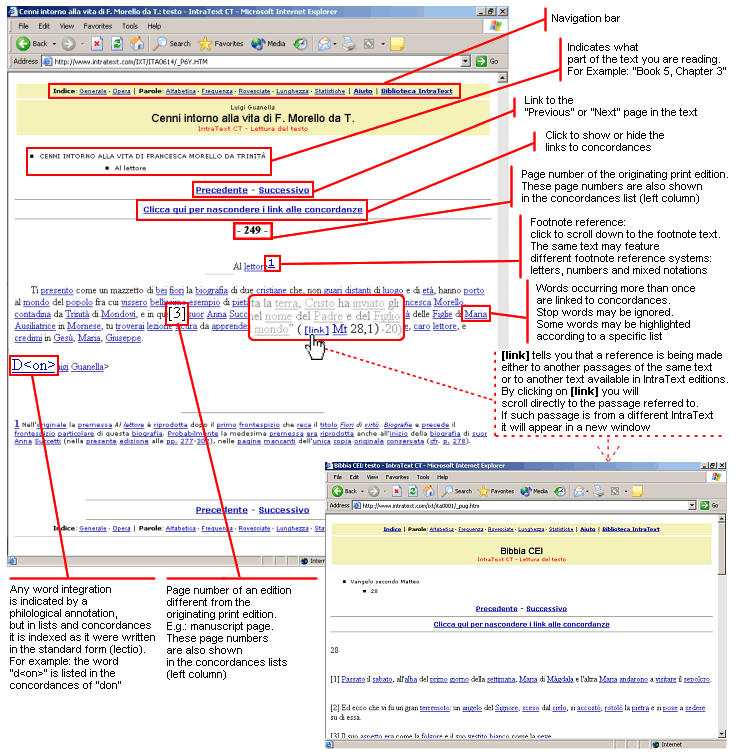
Figure 1: IntraText Text page
(demonstrative page - not for quotation)
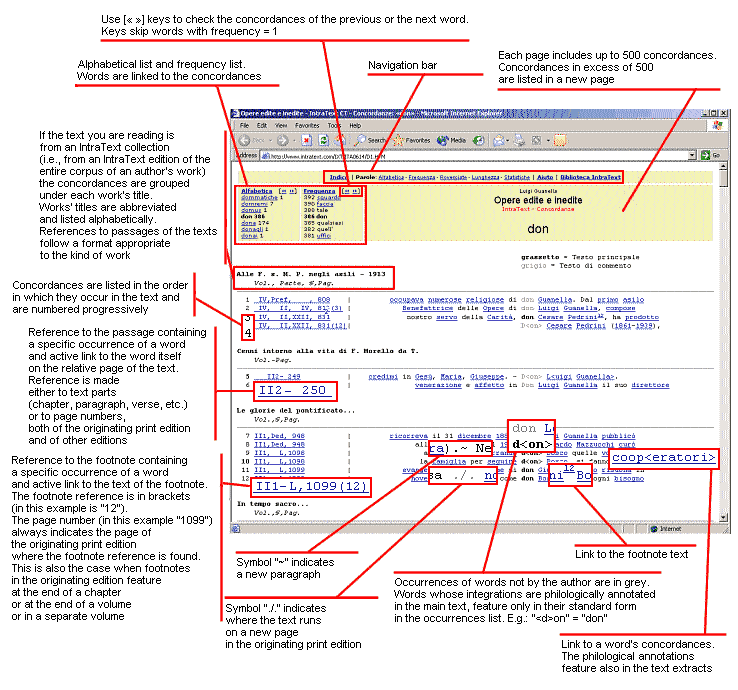
Picture 2: IntraText concordance page
(demonstrative page - not for quotation)
Overview: IntraText, IntraText collections and Tablet PC interface
General features
EuloTech IntraText® is a tool that offers an intuitive but very accurate interface to browse texts in a hypertextual way, based on a Tablet PC interface.
The IntraText interface applies a cognitive ergonomics model based on lexical hypertext and on the Tablet PC or touch screen interface. It uses a set of tools and methods based on HLT (Human Language Technologies).
From the reader's point of view
EuloTech IntraText is a reading, reference and search tool. It can be used to read a work, to browse a text as hypertext, to search for Mots and phrases just through a simple click of your pen or mouse.
Concordances, word lists, Statistiques and links to cited works are useful to drive your reading and to improve the knowledge of the text.
You can freely move from reading to any of the other features, since relevant Mots in the text are linked to their respective concordances and then back to the text. You can use any of the search and Aide options of your browser.
The Tablet PC interface allows to browse and search without keyborad, just using the mouse of the computer or the pen ot touch screen of the Tablet PC.
The ease of use and accessibility of IntraText are some of the most appreciated features.
From the publishing point of view
IntraText is a well structured tool to create and make available high quality electronic editions, particularly for the editorial, philological and linguistics aspects. IntraText editions can be published on Internet, Intranet or distributed on CD-ROM in several ways.
IntraText uses the lexical hypertextualization to define links between the text and the concordances of relevant Mots.
IntraText allows to reproduce faithfully the scholarly editions: footnotes (even when structured in several apparatuses), philological annotations, references to one or more different editions, distinction between the author's lexicon and the lexicon of other authors, several languages in the same text, etc.
Finally, IntraText allows intra- and extra-textual links to citations. Extra-textual citations are automatically linked when the cited work is available in IntraText edition.
Control of the editorial quality
The system that generates IntraText checks the text for several issues, according to a schema conceived to improve content quality and representation quality. In particular:
- lexical control:
the system displays Mots not matching a reference vocabulary and creates a specific check list; - footnote control:
if the text has footnotes, the system verifies the correspondence between footnotes and references and creates a detailed report. This feature has been included as many IntraTexts have thousands of footnotes. - multimedia element control (e.g. pictures):
if the text has multimedia elements, the system checks whether each multimedia element file is available and generates a detailed report. - references control:
if a text links to other parts of the same text or links to other texts available in IntraText edition, the system checks the coordinates of each quotation (e.g.: "Mt I, 28"), listing them in a check list.
IntraText collections
IntraText allows to create text collections as a whole hypertext, for example the Opera Omnia of an author, corpora, etc.
The IntraText collection creates a browsing system which preserves the identity of each collected text (author, title, structure, criteria for concordance reference) but unifies them through the concordances.
In an IntraText collection, the TOC has two levels: the index of the works and, for each work, its own TOC.
Main elements of the IntraText format
The IntraText format is structured in:
- the index page, displaying the work identification data, the Table des Matières, the credits and the link to the Index of footnotes (if they occur). The IntraText collections have a general Index page, containing collection data and the list of the collected works, and a TOC for each collected work.
- the text, which you access from the index or from the concordances.
IntraText reproduces all the elements of the more accurate editions, in particular:- notes: they are at the bottom of the page and they are listed in a specific Index;
- pictures: if the file format is Internet compatible;
- philological annotations: they are entirely reported. Annotations are considered in the concordances according to the indicated lectio (example: "h<o>use" in the text, but listed among the concordances of "house");
- reference to the page numbers of the printed editions: they are displayed in the text and can be used to quote extrActes in the concordances. The references to the editio princeps are pointed out;
- quotations of passages of the same or other works available in the IntraText edition: the system inserts a link to the quoted passage.
- links to the Internet sites: they are reproduced in the IntraText beside the lexical hypertextualization.
- the word lists: Alphabétique, by Fréquence, by Inversions order and by Longueur. In the list, Mots are linked to the concordances;
- the concordances, that is a sorted list of text extrActes defined around each occurrence of the word. The concordances are an extension of the KWIC model (Keyword in context) and they consider footnotes, philological annotations and the page numbers;
- the Statistiques about Mots, occurrences and other features of the text.
All pages are designed to be printed as they are.
Custom applications of IntraText are available on request, allowing special outputs: the text can be presented as a whole text page (instead of many text pages), as XML file or in other ways.
IntraText is built with high-compatibility HTML pages, which can be read by most browsers. HTML pages are optimized to be easily read, even with slow Internet connections and old computers.
See the Compatibility paragraph for further details.
Index
The Index page is the first access to the hypertextualized document. The Index shows the basic data of the work (author, title, etc.) and the TOC. The TOC items are linked to the text pages.
In case of an IntraText collection, the Index has two levels: the index of the collection - listing the collected works - and, for each work, its specific Index.
If the text contains footnotes, the summary displays also the item "Index of footnotes". Such index contains the list of the footnotes and the reference to the part of the text in which each footnote is called. The incipit of the footnote and the link to the full footnote in the text is also provided.
In the IntraText collections, each collected work having footnotes is provided with the related footnote index.
The "Credits" section is at the bottom of the Index page and reports information about the printed edition and the electronic transcription.
Editorial information about the text (peculiarities of IntraText edition, etc.) is also provided.
Text (features are summarized in figure 1 of the quick reference)
The Text is divided into pages linked to each other.
The Mots of the text are linked to concordances: just click on them to jump to the concordance of that word in the text or collection. Generally not all the Mots are linked, because:
- the hapax (i.e. Mots occurring once) haven't concordances;
- concordance of stop Mots (articles, prepositions, pronouns, etc.) are useless in most applications.
Thus about a half of all Mots of a text have actually the link to the related concordance.
In some IntraText editions, concordances can consider also the stop Mots or can be restricted to some Mots. Furthermore, in the text pages some Mots can be highlighted.
To improve readability, the links to the concordances can be hidden or shown while reading.
The picture 1 in the quick reference shows a page of an IntraText text.
Here some detail features:
- Mots having links:
in some IntraText editions, even stopMots can have link or links can be restricted to a set of Mots. - Highlighted Mots:
in some IntraText editions, some Mots or phrases can be highlighted. - Footnotes position:
footnotes appear in the bottom of the page. Each page displays the relative footnotes, even when in the original edition footnotes are placed at the end of the Chapitre, at the end of the book or in a separated volume. - Mots of footnotes in lists and concordances:
Mots pertaining to footnotes are generally included in the word lists, in the Statistiques and in the concordances. In concordances the Mots of the footnotes can be distinguished or omitted, depending on editorial criteria.
In concordances reporting the page number in text references, the occurrences of the footnotes are referred to the page in which occurs the reference in the text, even when in the original edition footnotes are placed at the end of the Chapitre, at the end of the book or in a separated volume. - Text parts not written by the author:
Mots pertaining to passages and footnotes not written by the author, like in editor's footnotes, are distinguished from the other Mots in concordances by a different colour.
Such information allows the reader to easily distinguish between the Mots of the author from those of another source.
In custom IntraText editions, Mots not belonging to the author can be highlighted and/or can be excluded from concordances or can be not distinguished from the author's Mots. - Pictures and multimedia elements:
if the text contains pictures or multimedia elements, they will be presented in the original position according to the features and the constraints of HTML.
- To browse a text:
- use the "Précédent" and "Suivant" buttons at the top and at the bottom of each page
- or click on the word "Index" in the navigation bar, then choose in the TOC the part of the text you wish to read.
If the text is a part of a collection, the navigation bar shows: "Table des Matières: Main - Work". To go back to the Index of the whole collection, click on "Main"; to go back to the Index of the collected work you are reading, click on "Work".
- To search for a word in the page you are reading:
- use the search function of the browser (CTRL + F or other keys depending on the browser). Then type the word you are looking for and click on the Search button.
- use the search function of the browser (CTRL + F or other keys depending on the browser). Then type the word you are looking for and click on the Search button.
- To search for a word in the whole text (or in the whole collection):
- go to the Alphabétique word list (the link is on the navigation bar)
- click on the letter corresponding to the first letter of the word
- use the search function of the browser (CTRL + F or other keys depending on the browser)
- type the word you are looking for and click on the Search button.
- if the word occurs in the text, it will be highlighted. Click the word to read its concordance.
Concordances (features are summarized in figure 2 of the quick reference)
In an IntraText edition, many Mots have a link to the page of its concordance.
The Concordance of a word is a list of short extrActes of text. Each extract corresponds to a concordance and displays some of the context before and after a particular occurrence of the word.
For example, the concordance of the word house is a list of short extrActes containing all the occurrences of the word house in the text. Suivant to each concordance, the reference to the section of the text in which the word occurs is provided. Such reference in an hyperlink to the text in the exact position of the word.
Such concordances are known as "KWIC concordances" (KeyMots in Context).
The IntraText concordances are KWIC concordances enriched with the peculiarities of the lexical hypertext and the scholarly edition.
In the IntraText concordances stop Mots, philological annotations and the number of the pages are considered. Even the Mots of the extrActes are linked to the related concordance, so that the reader can jump from the concordances of a word to those of another word, without returning back to text or lists.
Stop Mots in general don't have the concordances, but in some editions they could be created.
The extrActes display also: footnote references (linked to the respective footnote text), the paragraph breaking (symbol "˜") and page changes in the editio princeps (symbol "./.").
The figure 2 in the quick reference summarizes the features the IntraText concordances.
Features of the IntraText concordances in some particular cases:
- concordances in the IntraText collections:
in the IntraText collections, concordances report the occurrences of collected works.
They are grouped by work title (a short title is shown when the full title is too long) and are listed in each work in natural order.
The structure of the reference to quoted passages changes according to the structure of each work. - concordances of the hapax legomena:
the concordances of the Hapax legomena (Mots occurring once in a text) are compiled into one list in Alphabétique order.
The list has the same format as the concordances of Mots occurring two or more times.
In the text, hapax legomena do not have a link to a concordance, since the concordance would merely be the same passage that is currently being read. - concordances occurring in footnotes:
the concordances also include Mots contained in footnotes. In this case the link to the relevant passage in the text will display even the reference of the footnote in bold type.
Footnote references (like "1", "2" or "a", "b", etc.) aren't considered Mots of the text. - concordances of Mots not belonging to the author lexicon:
if in the text some passages don't belong to the author (editor's notes, introductions, titles added in scholarly editions, etc.), these Mots appear in the concordances in Grey instead of Black.
Custom IntraText editions can exclude such Mots or not distinguish them at all.
Concordances have been designed to be ready-to-print by using the printing options of your browser.
We suggest to set the printer in the landscape mode.
Lists
Alphabétique, by Fréquence, Inversions Alphabétique, by Longueur
These lists are a useful tool for reference, since they offer an outlook of the lexicon of the work. Each list presents Mots in groups by alphabet letter, by Fréquence and by Longueur. Alphabétique grouping is language-dependant: for example in Spanish "CH", "LL" e "Ñ" are letters like "A", "B", etc.
The Mots beginning with special characters are listed in the "Other" group.
In each list, both the total number of Mots ('tokens') and the total number of occurrences are displayed.
The Mots in the lists are linked to their respective concordances, except for stop Mots (prepositions, pronouns, etc.), which are not linked and in bold font.
In some IntraTexts, stop Mots can have concordance and in that case such Mots will have link to them.
To search within a list: CRTL+F (see above). Detailed instructions are given in the first page of each list.
Statistiques
The Statistiques page features an overview and graphs presenting textual data.
The Statistiques give a quantitative picture of the text and of the results of its hypertextualization.
The X axis of each graph is linked to the corresponding word list.
Tips for an easier reading of an IntraText edition
For an easier reading of IntraText:
- use a screen resolution of 800x600 or higher.
On a Tablet PC: use the portrait orientation at a resolution of 768x1024 or higher. - you can browse pages by displaying or hiding the links to concordances.
To change visualization click on "Click here to hide the links to concordance" or "Click here to show the links to concordance" in the upper part of the text page.
Some older IntraText could not allow hiding links to concordance. - links are usually underlined but some browsers allow to show underlines only when the pointer is on the link. This feature is very useful in reading the IntraText, since in IntraText all linked Mots are blue, so it's easier to recognize when the links are not underlined.
To set such feature, go to the Options or Preferences menu of your browser. - the pages of concordances are set to be displayed as fixed pitch text ("preformatted text").
If the concordances are not properly formatted, then you should set a fixed pitch font like "Courier new" (Windows). See the Aide page of your browser for further details.
Compatibility
EuloTech IntraText is created through HTML pages according to ISO and W3C standards. Pages and links are compatible with most browsers and operating systems.
IntraText has been coinceived to be used through a Tablet PC, a touch screen or simply with the mouse of any ordinary computer.
IntraText is compatible with reading tools for blind and disable people.
Specific techniques allow to minimize the amount of computer resources required to browse an IntraText.
IntraText runs on Internet, Intranet, CD, CDcard, DVD and USB drives.
IntraText has been tested with the following browsers:
- Firefox: all
- Lynx: all
- Microsoft Internet Explorer: all starting from version 2.0
- Mosaic: all starting from version 3.0 (1996)
- Mozilla: all
- Netscape Navigator: all starting from version 2.0
- Opera: all starting from version 3.10
- Palamito: all
Small display differences among browsers are normal and won't compromise readability of IntraText.
On some of the non-GUI browsers, like Lynx, the page headings of the concordances may seem a bit offset.
If you encounter compatibility problems using IntraText, please contact the IntraText editorial staff at info@eulotech.it.
The EuloTech IntraText Technology
IntraText is a registered tradeMarc of EuloTech SRL.
IntraText uses the lexical hypertextualization (an EuloTech idea) to transform text into an interactive hypertextual reference and search tool. It has developed in the HLT (Human Language Technologies) research field.
IntraText is a function of the EuloTech SLI lexical processing system. Text structure is formalized using ETML - EuloTech Text Marcup Language.
Further details on www.intratext.com.
Information about the EuloTech language technology is available at www.eulotech.it.
Glossary
- Fréquence. The Fréquence of a word form ("token") is the total number of occurrences of that word form in the text, that is how many times the word occurs in that text.
See also word. - graphic form. See word.
- hapax legomena (or hapax). In ancient Greek hapax legomena means "uttered only once". It is a term used in linguistics to refer to Mots that are found only once in a text.
- occurrence. See word.
- word. By word we mean a sequence of Alphabétique and/or numerical characters. For instance house, thousand, 325 are Mots.
Within a text, the same word may appear a number of times. When a word appears in a text, then that word is said to have an occurrence in that text.
If the word house appears 32 times in a text, we say that that text has 32 occurrences of the word house. The total of occurrences of a word is called Fréquence: so in our example, the word house has a Fréquence of 32;
For this reason, the size of a text is expressed in terms of occurrences. For instance, a standard edition of the Bible has about 800,000 occurrences, but about 25,000 - 35,000 Mots, depending on the language.
All Mots are treated as being lower case. For this reason, if a text contains House, HOUSE and house, they are all treated as occurrences of the word house.
In IntraText we use word in this meaning. In linguistic terminology the term graphic form is more correct. We use word for simplicity. - stop Mots. Stop Mots are the Mots to be ignored in text processing. Usually stopMots are the function Mots, that is those Mots in a language that have little lexical significance: articles, prepositions, pronouns, etc.
Function Mots occur very frequently: up to 40% of the occurrences, depending on the language.
In IntraText, function Mots are included in word lists, but do not have concordance.
However, if explicitly requested function Mots are treated just like all other Mots.